Sim graphics optimiser by F1GamerDad
Your PC, measured. Your settings, dialed.
Drive a few laps while Dialed records your frame times. It reads your sim's graphics settings, works out whether your processor, graphics card or graphics memory is holding you back, and gives you a short list of changes to make first, with the biggest gain for the least visual cost.

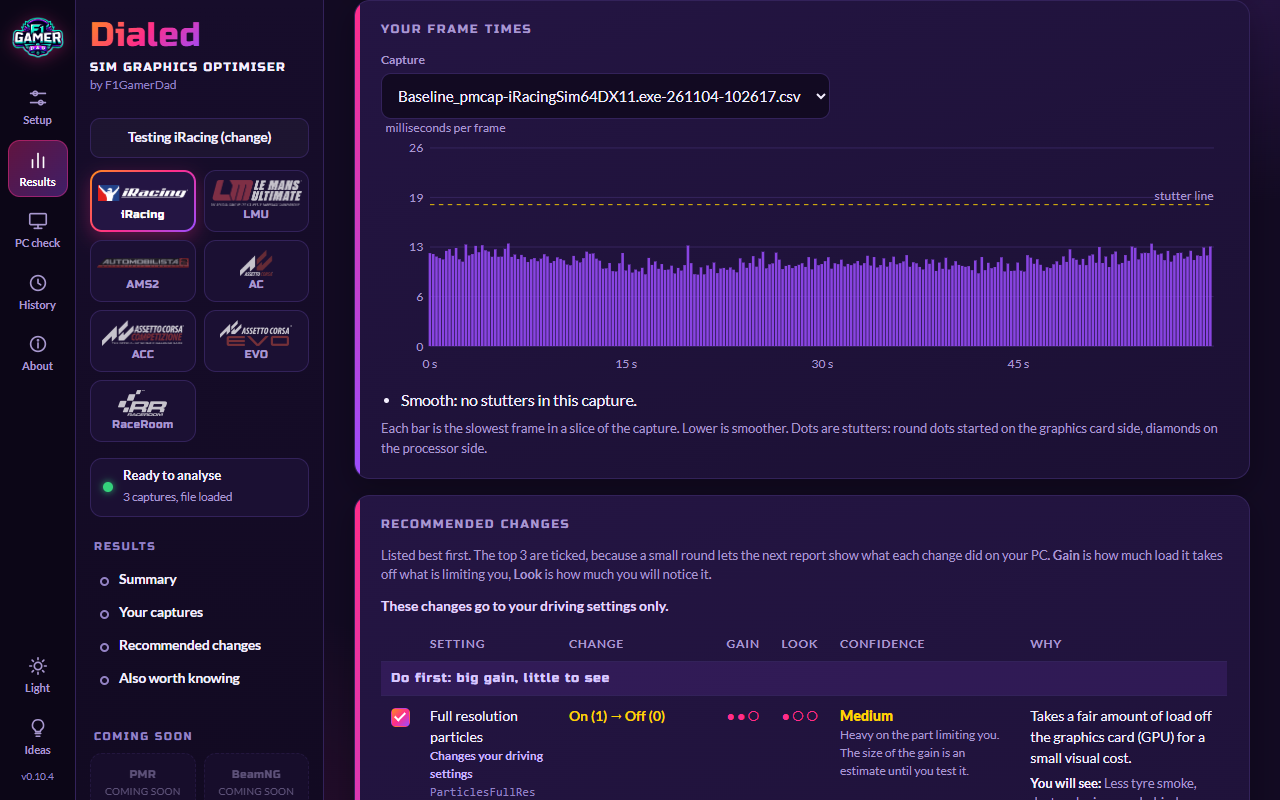
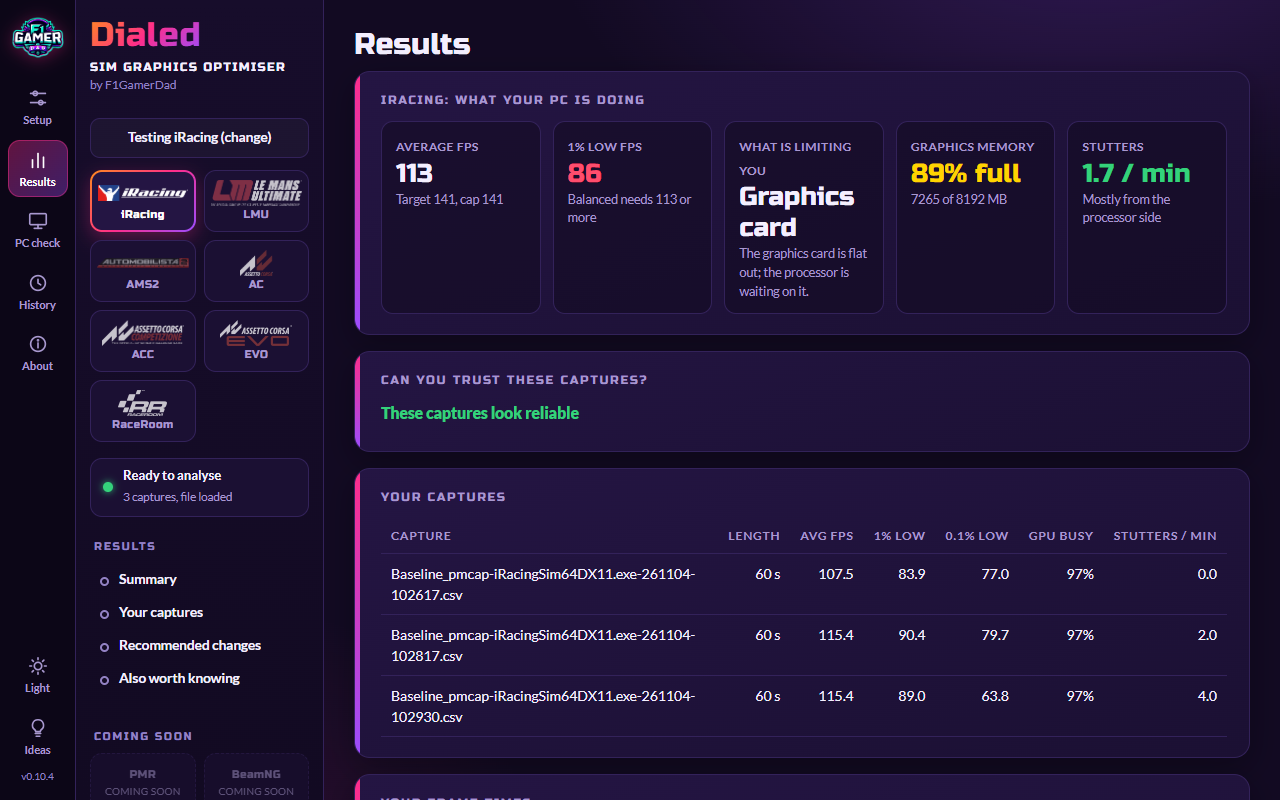
Real screen, real captures. Here the graphics card is flat out and graphics memory is nearly full, so Dialed looks for savings there first. Below it, your frame times over the capture.
That’s one of the best piece of simracing software I’ve used in the last couple of years.
It has made a huge difference. Long beach full grid used to be a nightmare but not anymore.
Absolutely awesome! Great for getting settings dialed in
Quick start
The first time you open Dialed it walks you through a short tour. Here is what to expect.
Dialed needs Windows permission to measure your frame rate, so Windows asks when it opens. Open Dialed before you start your sim: that prompt can freeze a full-screen game. Set your game to Borderless Windowed so it stays on screen when you click another monitor.
iRacing, Le Mans Ultimate, Automobilista 2, Assetto Corsa, ACC, AC EVO, RaceRoom, Project Motor Racing and AC Rally today, with the rest coming soon. Dialed finds your games for you, and each sim keeps its own settings table and its own history.
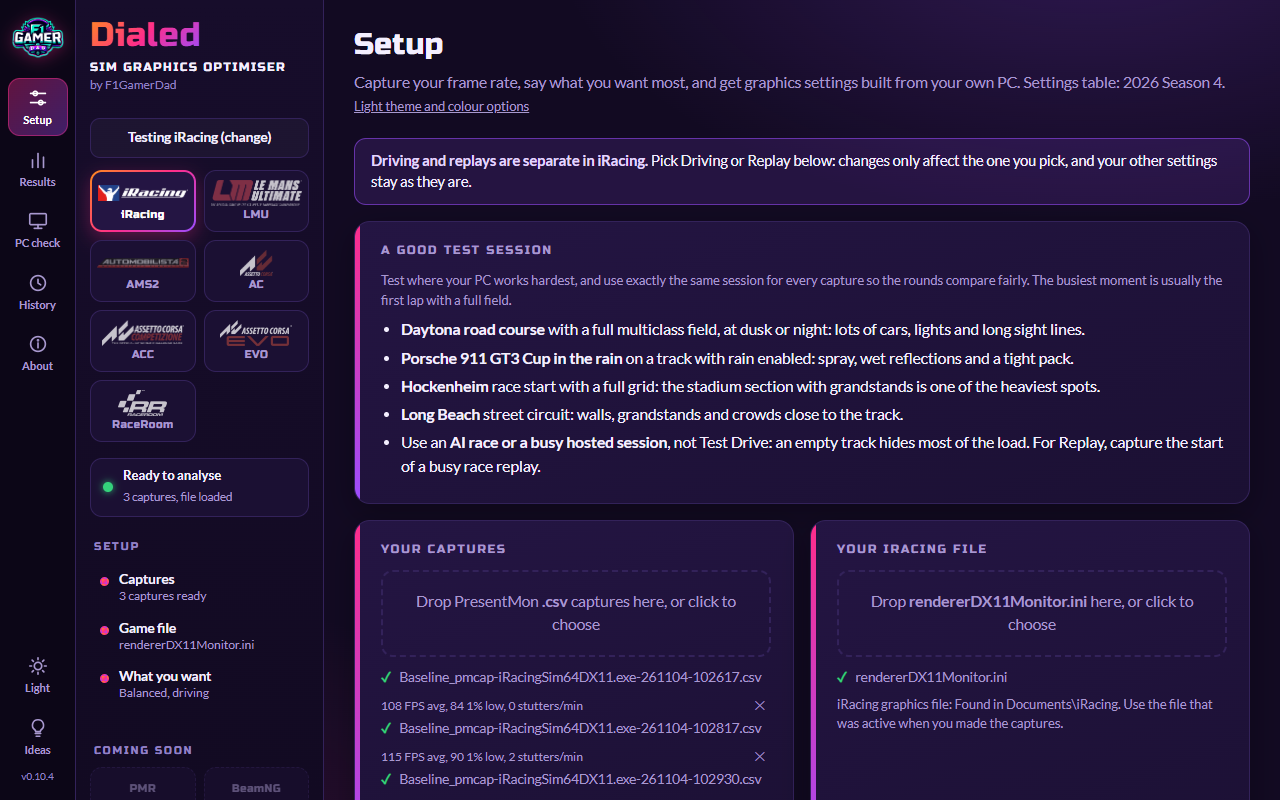
Start your game and press the hotkey while you drive. You get a spoken or beeped countdown, then 60 seconds are recorded (or 120 or 150, if you want a whole lap on a long track such as Spa). Do it three times in the same session, with a full grid on your heaviest track if you can, or let Dialed run all three for you.
Dialed works out whether your processor, graphics card or graphics memory is the limit, then lists the changes best first with their gain, visual cost and how sure it is. The top three are ticked for you.
One click backs up your settings file, closes the sim after a big warning, and writes the change. Start the game, capture again, and Dialed tells you what each change did and what to put back.
The PC check finds problems outside the sim. Results draws your frame times and marks every stutter. Save profiles, share a before/after image, and tell Dialed how you race under About your setup.
How it works
No guessing and no copying someone else's settings. Everything is worked out from your own frame data and your own settings file.
Press a hotkey while you drive. Dialed records about a minute of frame data with Intel PresentMon, which it includes. Do it three times for firmer advice, or let Dialed run three in a row for you.
It works out your average FPS, your 1% lows and stutters, and whether the processor, graphics card or graphics memory is the limit.
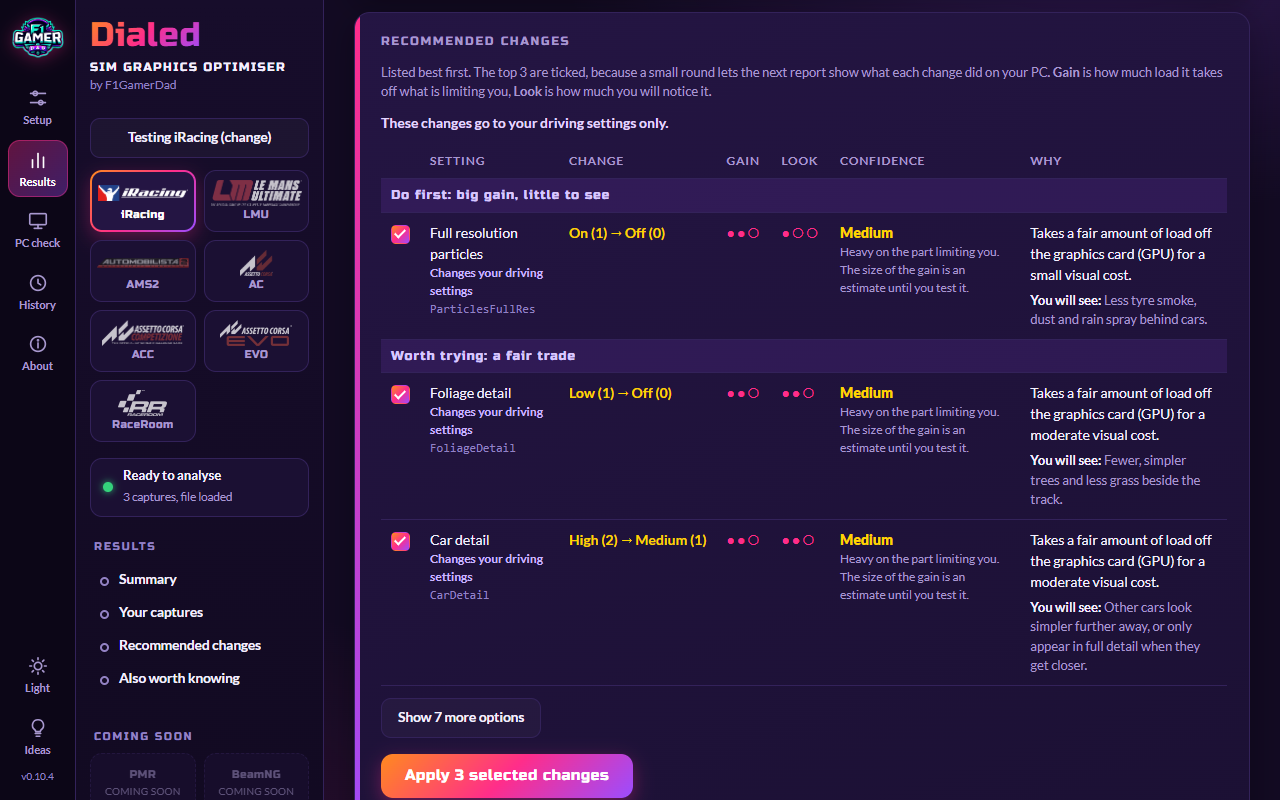
A short priority list, best first. Each setting shows its gain, its visual cost, plain-English what you will see change, and how confident Dialed is. The top three are ticked for you.
One click backs up your file into a visible Dialed Backups folder and writes the changes. If the sim is open, a big warning tells you it will close first.
Capture again. Dialed remembers each round, tells you what every change did, and suggests what to put back if something made it worse.
Restore any backup from inside the app. Your current file is backed up first, so even a restore can be undone.

The priority list: what to change, how much load it takes off, how much you will notice it, and how sure Dialed is.
Big improvement on my rig, and I’ve been tweaking on this stuff for years!! Thank you!!
Running triples on iRacing feels smoother than it ever has
Built to be trusted
There is no AI running on your PC and nothing is sent anywhere to get your advice. Dialed uses a table of what each setting costs and what it looks like, checked against recorded captures, and it says plainly when it is only estimating.

It caught that my memory speed was back down at 2133 MT/s rather than its XMP speed of 3600!
So easy to use and its made a big improvement on my rig.
More than a settings list
Some of the biggest frame rate problems are not in the sim at all. Dialed looks at those as well, and makes the whole process easier to repeat and to share.
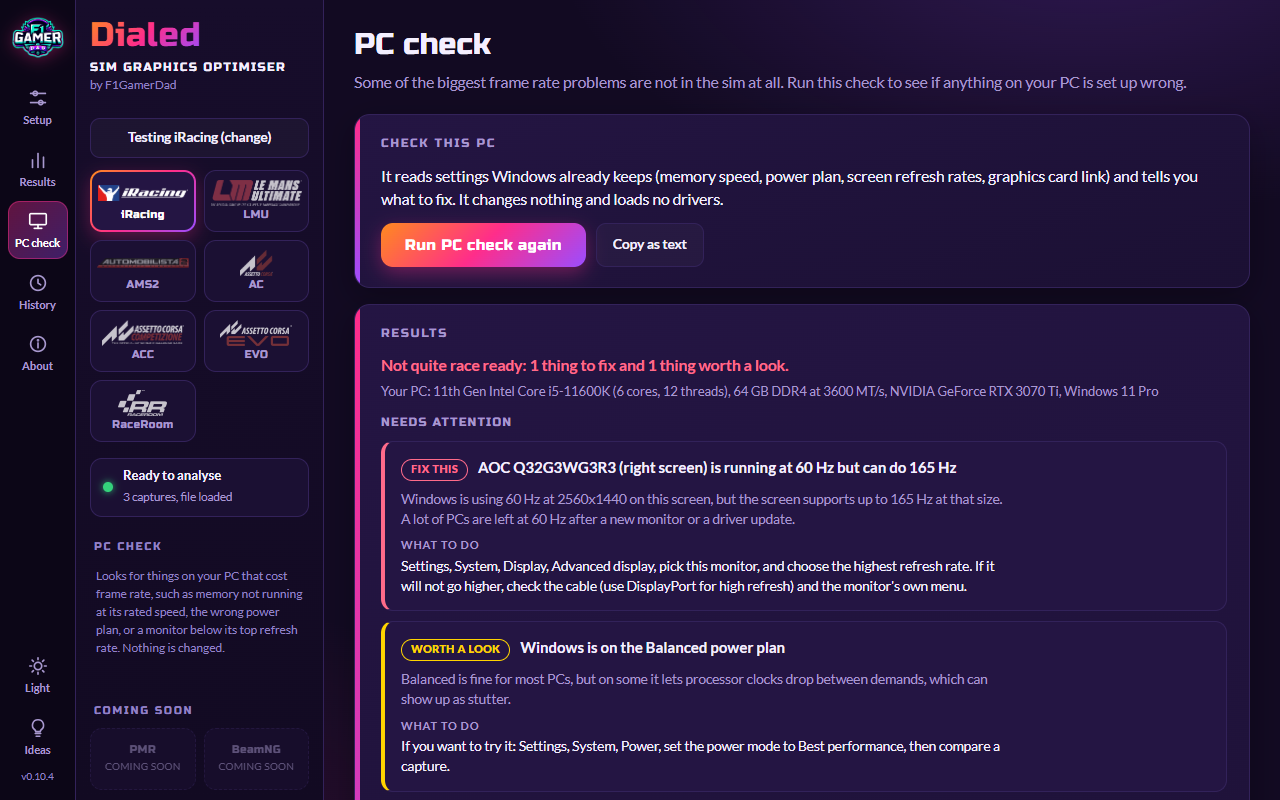
Finds memory running below its rated speed (XMP or EXPO off), the wrong power plan, a screen below its top refresh rate, screens plugged into the motherboard, a graphics card on fewer lanes, and more. It tells you what to do about each one.
See your capture over time with every stutter marked and a plain-language reading of what is causing it.
Tell Dialed how your screen syncs, whether you stream, and which settings it must never touch. Your screen's refresh rate is the default target.
Save your settings as "Daytona" or "Rain" and put them back with one click, with a backup first.
Press once and Dialed records three runs back to back, with spoken cues in F1GamerDad's voice or plain beeps, your choice.
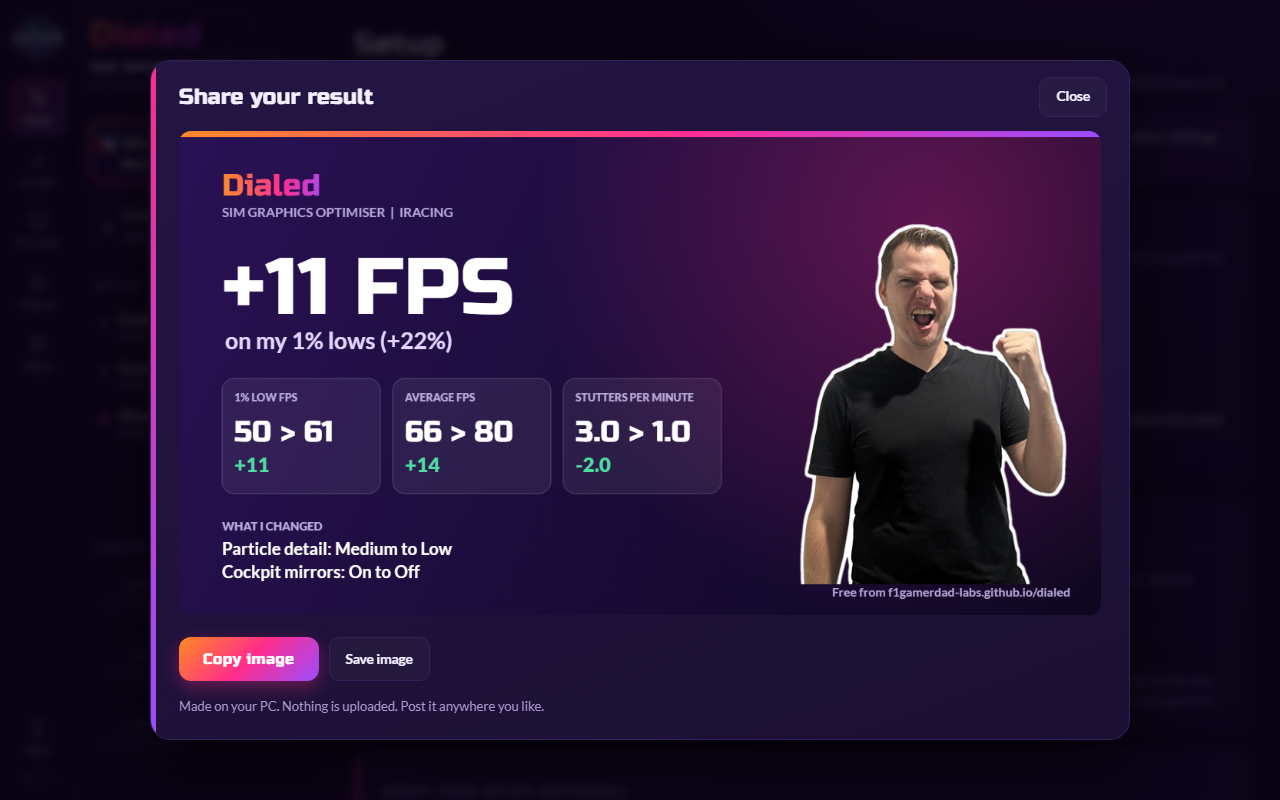
Make a before/after image of your gain for Discord or a comment. It is made on your PC and nothing is uploaded.

The PC check on an example PC with a screen left at 60 Hz and the Balanced power plan. Each finding says what it found, why it matters and what to do.

Your frame times over a capture. Every stutter is marked, with a plain-language reading of what is causing it.

The share image, made on your PC for Discord or a comment. Nothing is uploaded.
I recently upgraded my graphics card specifically for VR use and this app has significantly gained FPS for me. Thank you!
I’m able to run full grid on AC, at dusk, Heavy thunderstorm going on, headlights, all reflections and even a Reshade preset.
It has improved my overall performance in LMU
Sims
Pick your sim under the Dialed name in the left pane. Each sim has its own settings table, its own history and a suggested heavy test session. Dialed finds your games through Steam.

Driving and replay settings, kept separate. Also supports VR, for iRacing only for now, tested on a Pimax Dream Air.
Supported
Reads both of its settings files and changes them together, or not at all.
Supported
Lowers settings one careful step at a time. Restart the game after applying.
Supported
The original, with Content Manager and Custom Shaders Patch support. Dialed closes Content Manager with the game when you apply, because it would otherwise write the old settings back.
Supported
21 graphics settings, from resolution scale and shadows to mirrors and fog. Dialed writes the files ACC reads at launch, so there is nothing to re-select in the menu.
Supported
Textures, shadows, reflections, mirrors, particles, visible cars and more. Dialed closes RaceRoom before applying, because the game rewrites its file when it exits.
Supported
23 graphics settings, from supersampling and anti-aliasing to shadows, reflections, clouds and mirrors, one careful step at a time. Upscaling is left to you.
Supported
New. The 15 graphic quality settings, one careful step at a time. Upscaling and the frame limit are left to you.
Supported
New. The Advanced Graphics settings, from shadows and reflections to draw distances and textures, one step at a time.
Supported
Uses BeamNG's own quality levels and its own cost ratings.
Coming soon
On the list. Support is still to be built.
Coming soon
On the list. Support is still to be built.
Coming soonThis app is a life saver. [...] This is a game changer for me.
Wow! Thank you so much for sharing this, and what a difference it has made!
Download now
Dialed is free and always will be. Enter your email and I'll send you the download link, plus a short note when something worth knowing lands (a new sim, a big settings update). One click to unsubscribe, any time.
Click the confirmation link in the email and the Dialed download link is in there. Nothing yet? Look in spam or promotions, and give it a few minutes.
Already on my list, or still nothing after a few minutes? Kit does not send a new email to people who have already confirmed, and some mail providers (Yahoo, Outlook) hold it back. Go straight to your download.
While you wait, two things that make a big difference to me:
Sign up above and check your inbox. The email has the installer (58 MB). Prefer no installer? The same email has the portable zip.
Run the installer and click through it. It adds Dialed to your Start menu and, if you tick it, your desktop, and you can uninstall it from Installed apps. Using the zip instead? Right-click it, choose Extract All, and put the folder somewhere permanent. Do not run it from inside the zip.
Open Dialed before you start your sim. It asks for administrator rights because PresentMon needs them, and that prompt can freeze a full-screen game.
Help
Dialed is not signed with a paid code-signing certificate yet, so Windows shows this for any new app. Click More info, then Run anyway. The full source is public on GitHub if you want to check what it does.
That can happen with new, unsigned programs, and more so with ones that measure frame rate and ask for administrator rights, which Dialed does. It is a false alarm, but you do not have to take my word for it. Every release lists a SHA-256 checksum for each file (in the release notes and in SHA256SUMS.txt on the releases page). In PowerShell, Get-FileHash .\Dialed-Setup.exe prints yours, and the two should match exactly. The full source is public on GitHub, and frame capture is Intel's open-source PresentMon. If your antivirus keeps blocking it, tell me which one and which file, and I will send it to the vendor as a false positive.
Only when you press Apply, only the graphics settings it lists, and always after saving a backup. Backups live in a visible Dialed Backups folder next to the sim's own settings, and you can restore any of them in the app.
Sims rewrite their settings file when they exit, which would overwrite the change. So Dialed warns you clearly, closes the sim, saves the file, and you start the sim again.
Pick the heaviest session your PC handles: a full grid, ideally in rain or at night, and capture the first lap. The Setup page lists suggested tests for each sim, and a Launch button starts the game through Steam with Dialed already open. Use the same session every time so rounds compare fairly.
Yes, with the original Assetto Corsa. Dialed changes the video settings in Documents\Assetto Corsa\cfg\video.ini. If you use Custom Shaders Patch it also adjusts its performance settings (pixel density, level-of-detail distances, lighting, shadows, Extra FX, particles, mirrors, rain and grass), but only for features you have switched on, and only by writing into CSP's own small override files. Content Manager keeps its own copy of AC's settings and writes it back when the game closes, so Dialed closes it together with the game when you apply and tells you first. Weather mods such as Pure are left alone. This is the original Assetto Corsa; Assetto Corsa Competizione and AC EVO are separate games, and Dialed supports those too.
Yes, for iRacing only for now. Choose VR on the start screen and Dialed tunes your iRacing VR file: render resolution, foveated rendering and the usual graphics settings. If your headset uses motion smoothing, you can aim for half your headset's refresh rate. I have only tested it on a Pimax Dream Air, so I can't guarantee the results on other headsets. If you try it, please use Share my result after each round so I can keep testing. The other sims are monitor-only for now. NextLevelXR is a separate VR tool that I use and recommend; Dialed is independent and does not replace it.
Use the Report button in the app. It saves a zip with your log and (if you tick them) your captures and graphics settings, and sends your message to me. The zip is not uploaded by the app.
No. The only network use is checking GitHub for updates (which you can switch off) and the Report and Ideas buttons when you press them. There is also an optional Share my result button that shows you exactly what it would send and only sends it if you press Send. The more results people share, the more confident the recommendations can become over time. If you want to help improve the advice without pressing it every time, you can tick "share automatically" there (or in About). Then each finished round sends the same anonymous summary: the sim, what limited your PC, the settings changed with their confidence, whether each change was kept, the before and after frame rates and, if you ran the PC check, your processor, graphics card, memory and screen count. No name, email, file paths or capture files. It is off until you turn it on, and you can switch it off at any time.
You give it to get the Dialed download link. It goes into my email list (run by Kit), and I use it to send you Dialed updates and the occasional F1GamerDad sim racing email. You can unsubscribe in one click from any email. I don't sell it or share it. The app never sees your email, and it is never linked to results you choose to share.
Use the Ideas button in the app, or the form it opens.
Always free
Dialed is a hobby project from F1GamerDad, and it will always be free for everyone.